
01 - Maintaining Character Consistency Across Style & Environment
This experiment began with a personal brief. I wanted to announce that I was leaving Amazon after nine years. Rather than write a standard post, I chose to create a short animated piece that illustrated a journey.
The creative concept was simple. A character moves through different environments and visual styles, symbolising change, growth, and the unknown ahead.
The technical challenge sat underneath that idea. Could I maintain a consistent, recognisable character across multiple art styles and motion systems using generative tools?
The goal was not just to produce a polished video, but to stress test how well AI workflows can support narrative continuity, stylistic variation, and motion without losing identity.
Final Video
Challenge
Create a short animated journey using multiple visual styles while maintaining character consistency across image and video generation tools.
What I tested
-
Cross tool consistency between image and video generators
-
Prompt refinement for consistent character outputs
-
Style shifts without breaking recognisability
-
Motion realism versus stylised animation
-
How much manual correction is required to preserve identity
Tools Used
Grok - Video Creation
Nano Banana Pro - Character Concepts/ Scenery
Eleven Labs - Custom Sound Effects & Music
Phase 1 - Building Controlled Character Reference Sheets
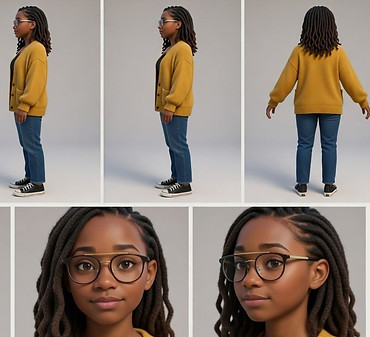
I began by using real images of myself as base material.
From these, I generated multiple controlled 3D-style character reference sheets, including:
-
A stylised Pixar-inspired version
-
A more realistic cinematic version
-
Neutral front-facing reference renders
Each sheet defined:
-
Facial proportions
-
Hair structure
-
Colour palette
-
Skin tone
-
Lighting direction
The goal was not to generate “a cool version of me.” It was to create anchor assets that could stabilise identity across generations.These reference sheets became the foundation of the workflow.
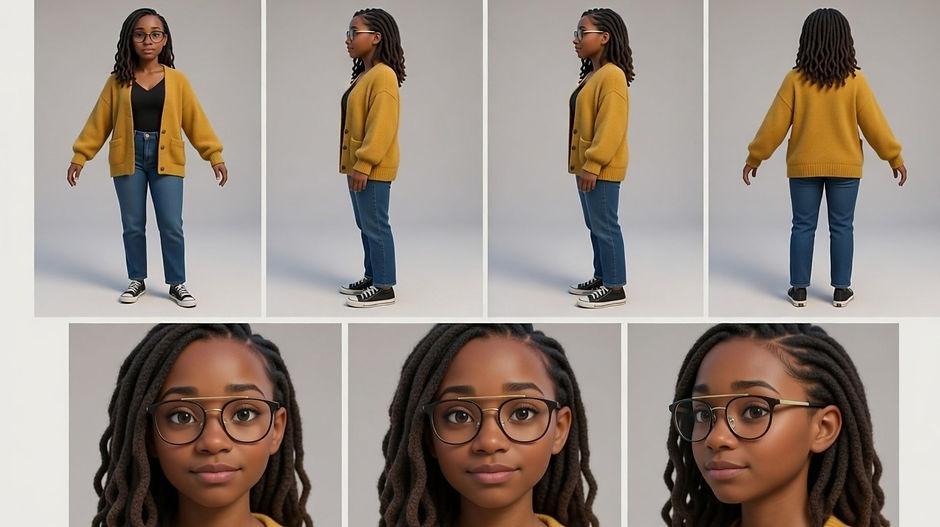
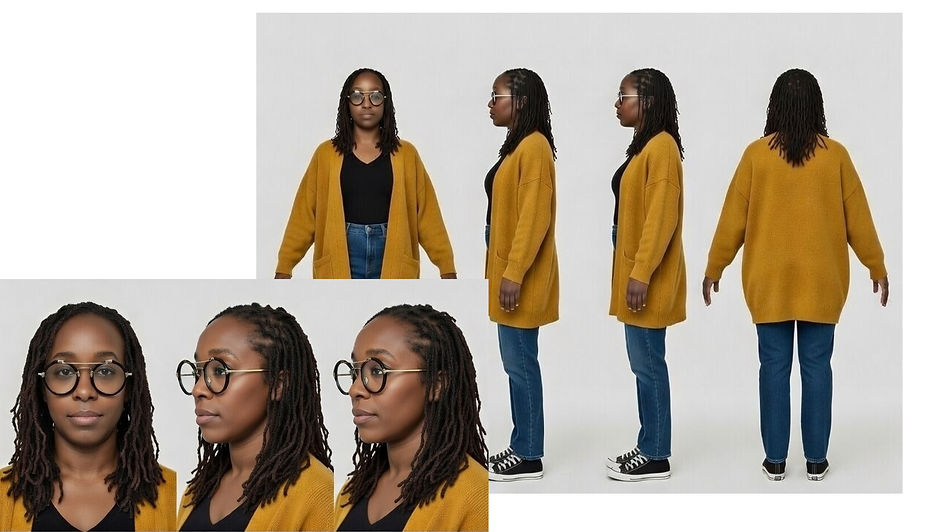
Character Sheet Prompt
Create a professional character reference sheet based strictly on the uploaded reference image. Use a clean, neutral plain background and present the sheet as a technical model turnaround while matching the exact visual style of the reference (same realism level, rendering approach, texture, color treatment, and overall aesthetic). Arrange the composition into two horizontal rows.
Top row: four full-body standing views placed side-by-side in this order: front view, left profile view (facing left), right profile view (facing right), back view.
Bottom row: three highly detailed close-up portraits aligned beneath the full-body row in this order: front portrait, left profile portrait (facing left), right profile portrait (facing right). Maintain perfect identity consistency across every panel. Keep the subject in a relaxed A-pose and with consistent scale and alignment between views, accurate anatomy, and clear silhouette; ensure even spacing and clean panel separation, with uniform framing and consistent head height across the full-body lineup and consistent facial scale across the portraits. Lighting should be consistent across all panels (same direction, intensity, and softness), with natural, controlled shadows that preserve detail without dramatic mood shifts. Output a crisp, print-ready reference sheet look, sharp details. Place close attention to the face only from the second reference picture and the black glasses with the gold bar running across the top and across the nose.
Phase 2 - Structured Prompt Libraries
Rather than writing fresh prompts each time, I built reusable prompt libraries organised by category:
Character Base Prompts
Defined core physical traits and proportions and then applying the above character reference sheet to build out the 3d model references.
Camera Angle Prompts
I compiled a list of prompts for different camera angles that could be used to create a more cinematic feel to the video. This included the below but I built out a list of 38 different camera shot options to make a camera angle prompt list:
-
Close-up
-
Mid-shot
-
Over-the-shoulder
-
Low angle
-
Tracking forward
Phase 3 - Video Stitching and Continuity Logic
To extend sequences, I experimented with using the final frame of one generated clip as the input reference for the next.
In theory, this should have preserved visual continuity.
In practice, the new scene was treated as an entirely independent generation based solely on that single frame. This led to:
-
Subtle facial drift
-
Proportion inconsistencies
-
Lighting degradation
-
Loss of fine character detail
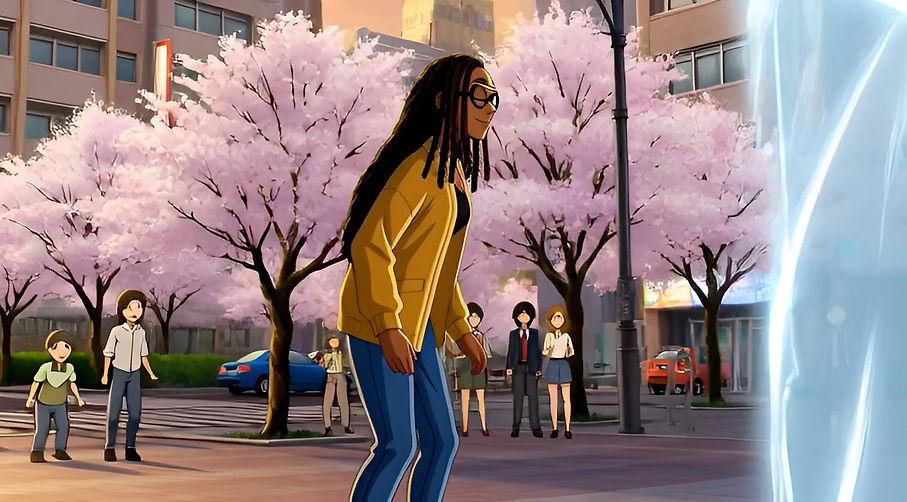
An example of this in practice is shown below, where it made the hair of the character longer at the back because the referenced end frame from the last video was front on only.
Relying on the end frame alone wasn’t enough to stabilise identity.
After multiple iterations, I refined the workflow by combining:
-
The end frame of the previous clip
-
The original structured character reference sheet
-
Reinforced prompt controls for lighting and camera
Reintroducing the character reference anchor reduced drift significantly and restored quality consistency.
Even with improved generation, some manual intervention was still required. I trimmed and edited clips to remove awkward pauses or unnatural mid-frame freezes that occurred during stitching.
Interestingly, rapid shifts in environment and art style reduced the visibility of minor inconsistencies. In sequences where transitions were more noticeable, switching camera angle between clips helped mask subtle continuity breaks.
This phase reinforced an important insight:
-
Frame continuity alone is not identity continuity.
-
Character anchors must be reintroduced deliberately at each stage.
Key Learnings
-
Structured prompts outperform descriptive prompts. i.e sectioned component in the prompt, like one on character, one on camera angle, one on lighting. Then combining the components into a singular prompt
-
Reference images dramatically reduce character drift.
-
Camera libraries create smoother stitching.
-
Tool selection should be stage-specific, not aesthetic-driven.
-
Generative systems require governance, not just creativity.
Outcome
The project resulted in a repeatable generative workflow capable of:
-
Maintaining character recognisability across art styles
-
Preserving proportion and facial consistency
-
Supporting multi-scene stitched video
-
Reducing unpredictable output variances
More importantly, it reinforced a broader insight
Generative AI becomes viable for creative production when treated as a system to be directed. Only then does it help to reduce unpredictability in it's output